I’ve built bespoke WordPress themes for years, and forms have always been one of those things that feel like they should be incredibly simple. You build the markup, collect a few fields, send the submission somewhere and show the user a success message. In reality, the moment you start looking for a solution inside WordPress, things can get complicated surprisingly quickly.
There are already plenty of excellent WordPress form plugins, so I didn’t set out thinking the ecosystem desperately needed another one. My frustration was slightly different. A lot of the plugins I’d tried didn’t just want to handle my form, they wanted to build it too, and that rarely fitted naturally into the way I build bespoke WordPress websites.
That’s what eventually led me to build Form Relay.
I didn’t want another form builder
When I’m developing a bespoke WordPress theme, the frontend normally already exists before I start thinking about how the form submissions are going to be handled. I’ve designed the components, written the HTML, decided how the fields should behave and styled everything as part of the wider design system.
Installing a form plugin at that point can sometimes feel like moving backwards. Instead of connecting the form I’ve already built to WordPress, I’m suddenly recreating it inside another interface, dealing with generated markup or trying to make a plugin’s structure fit naturally into a design that was never built around it.
For someone who doesn’t want to write their own HTML, that form-building experience can be incredibly useful. For a developer building a completely bespoke theme, though, sometimes all I really want is a hook.
I wanted to be able to write something as simple as:
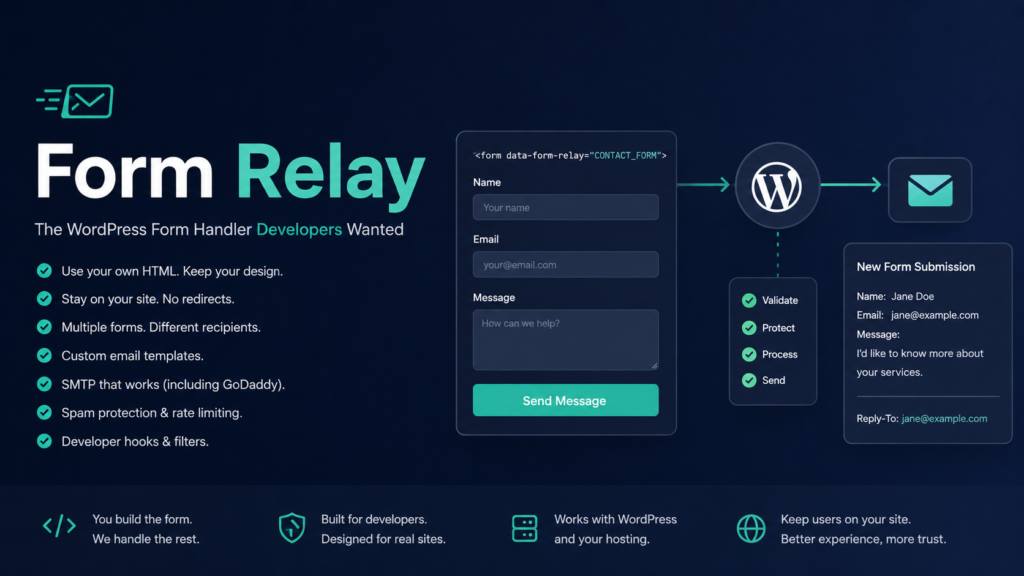
<form data-form-relay="YOUR_FORM_ID">
and effectively tell WordPress: this is my form, please handle the boring bit for me.
The plugin shouldn’t need to own the frontend. The developer should.
Why my original approach didn’t quite work for me
Before Form Relay, I originally used Formbold to handle submissions on my site. It solved the immediate technical problem perfectly well: I had an HTML form and needed somewhere to send its data.
The part I wasn’t completely happy with was the user experience around the submission. In the setup I was using, completing the form could take the visitor away from my website and into an unfamiliar environment. As the developer, I understood exactly what was happening, but I kept thinking about how that interaction might feel to someone who had simply visited the site to send me a message.
If I’d filled out a contact form, pressed submit and suddenly found myself somewhere I didn’t recognise, I’d immediately wonder whether something had gone wrong. The domain has changed, the page looks different and the experience I’d been interacting with has disappeared. Even if everything is technically working correctly, that sudden change can still feel unsettling.
I wanted the form to remain part of the website experience from beginning to end. The visitor should press submit, see that something is happening, receive a clear success or error response and continue using the site without wondering where they’ve just been transported to.
That became one of the main motivations behind Form Relay.
Building the bit in the middle
The idea behind Form Relay is deliberately straightforward. I don’t want it to build the form itself. I want it to sit between the HTML I’ve created and WordPress, handling everything that needs to happen after the visitor presses submit.
The form can remain completely ordinary HTML:
<form data-form-relay="YOUR_FORM_ID">
    <label>
        Name
        <input type="text" name="name">
    </label>

    <label>
        Email
        <input type="email" name="email">
    </label>

    <label>
        Message
        <textarea name="message"></textarea>
    </label>

    <button type="submit">Send</button>
</form>
The data-form-relay attribute connects that form to a configuration inside WordPress. From there, Form Relay can collect the fields, submit them through WordPress, send the email and return the appropriate response without dictating how the form itself has been constructed.
That thin integration layer is probably the part of the project I care about most. I can build the frontend exactly how I want, while the repetitive submission infrastructure becomes something reusable across the site.
In other words, I wanted the backend plumbing without somebody else redecorating the bathroom.
Tackling all the annoying parts of WordPress forms
The earliest version of this project could have been extremely small. Receive some values, sanitise them, pass everything to wp_mail() and call it a day. Unfortunately, once I started using it properly, I remembered just how many little annoyances I’d encountered when building forms in the past.
A site rarely has one form forever. A contact form eventually gets joined by an enquiry form, a recruitment form, a brochure request or something marketing has invented at 4:47pm on a Friday. Those forms might need different recipients, email subjects, sender details, success messages or completely different behaviour after submission.
I wanted Form Relay to handle that without changing the frontend integration. Each form can have its own configuration inside WordPress, while the theme still only needs to associate the existing HTML with the appropriate Form Relay ID.
The same thinking applied to email templates. I didn’t want every submission arriving as an ugly dump of field names and values, so templates can use placeholders for information such as the form name, site name, page title, submitted fields and submission time. Individual field rows can be templated too, which means the email can look intentional rather than like WordPress has coughed an associative array into my inbox.
There’s also an email preview in the WordPress admin, because repeatedly submitting a contact form with test@test.com and a message containing PLEASE WORK THIS TIME is apparently not a scalable QA process.
Making it work with my GoDaddy setup
A big part of why this became a passion project is that I wasn’t building it as a theoretical exercise. I genuinely needed it for my own website, which was running on GoDaddy hosting, and I wanted the plugin to work cleanly within that environment.
Email delivery quickly became a much larger part of the project than I’d originally expected. Form Relay can use the normal WordPress mail configuration, which means it can work alongside an existing SMTP plugin without trying to replace it. It can also use a custom SMTP server or a local SMTP setup suitable for environments such as GoDaddy and cPanel.
I also wanted the sender behaviour to be correct rather than simply taking the visitor’s email address and pretending the server was sending mail from it. The visitor’s submitted address is used as the Reply-To, while the actual From address belongs to the site’s own domain.
That matters because modern email delivery involves things like SPF, DKIM and DMARC, and mail servers understandably get suspicious when a random website suddenly announces that it is sending email on behalf of an unrelated domain. Using the site’s authorised sender address while keeping the visitor as the Reply-To makes the whole setup much more sensible.
This was also the stage where a project that had begun with “I need my contact form to send me an email” somehow resulted in me staring at cPanel delivery logs and diagnosing SMTP responses. Web development has an incredible talent for turning a tiny requirement into an accidental infrastructure course.
Keeping the experience on the website
One of the most important differences from my previous approach is that Form Relay handles the submission asynchronously through WordPress. The visitor stays on the site while the form is being processed, so there isn’t an unexplained jump into another service or environment.
While a submission is being sent, the form can display a loading state and temporarily disable the submit button. Once WordPress responds, the visitor can either receive an inline success message or be redirected to a proper WordPress thank-you page, depending on how that particular form has been configured.
Errors are handled within the same experience too. From the user’s perspective, the form simply behaves like part of the website because that’s exactly what it is.
It isn’t an especially glamorous feature when described technically, but it’s one of the main reasons I wanted to build the plugin in the first place. The implementation should disappear into the experience rather than reminding the visitor that three different systems are talking to each other behind the scenes.
Building something I could actually reuse
Once you’re exposing an endpoint that can send emails, you also have to accept the unfortunate reality that the internet exists.
Form Relay therefore grew a number of protections around the submission process, including same-site checks, WordPress REST nonce validation, honeypot protection, rate limiting, duplicate submission detection and limits around field and payload sizes. None of those were particularly exciting features to add, but they’re the kind of details that make the difference between something I’ve hacked together for one page and something I’d actually feel comfortable reusing.
I also didn’t want the plugin to become so opinionated that another developer would immediately have to modify its source code. There are WordPress filters and actions throughout the submission flow, allowing things like submission data, email content, subjects, sender information, SMTP configuration, error handling and various limits to be customised.
That’s where I think the developer-focused nature of Form Relay becomes most obvious. It isn’t trying to provide every possible option through a giant visual interface. Instead, it gives developers sensible defaults and places to hook into the behaviour when they need something different.
I wanted it to have opinions, but not handcuffs.
Building Form Relay with Codex
Another reason I’ve enjoyed this project so much is that I’ve been developing it alongside Codex. AI-assisted development has become increasingly interesting to me, particularly when it’s used as part of an iterative development process rather than simply asking for a finished chunk of code and hoping everything works.
My workflow with Form Relay has been much closer to working alongside another developer. I’ll describe how I want something to behave, implement it with Codex, test the result and then inevitably discover something else that needs changing. That might uncover an edge case, lead to a refactor or give me another idea that definitely wasn’t part of the original scope.
The benefit for me isn’t that I no longer have to think about the code. If anything, I’ve spent more time thinking about behaviour, architecture and the little details that I want the finished plugin to get right. Codex has simply made it quicker to move between an idea and something I can actually test.
Unfortunately, giving me the ability to implement ideas faster has done absolutely nothing to improve my ability to stop having ideas. If anything, I’ve armed the problem.
Why I’m sharing Form Relay
Form Relay isn’t intended to replace the established WordPress form builders, and I don’t think it needs to. Those plugins solve a very real problem for people who want to create and manage forms entirely from within WordPress.
This project is aimed at a slightly different audience. It’s for developers building bespoke WordPress themes who already know how they want the frontend to look and behave. They don’t necessarily need another form builder. They just need something reliable to handle the submission after they’ve built it.
That was the frustration I kept running into myself. I didn’t want my form handling solution to dictate my HTML, rebuild my design inside another system or unnecessarily send visitors away from the experience I’d created. WordPress was already sitting behind the site, so I wanted a clean way to let it handle that infrastructure without taking over the frontend.
Ultimately, I didn’t build Form Relay because I thought WordPress desperately needed another form plugin. I built it because I needed it, and because it solved a collection of little frustrations I’d accumulated from building WordPress forms over the years.
If another developer has ever finished building a bespoke form, looked at the available integration options and thought “please just let me keep my HTML”, hopefully they’ll find Form Relay useful too.
You can find Form Relay on GitHub:
github.com/barrytickle/godaddy-wordpress-form-relay
All I wanted was a form submission handler. Somehow, it became a passion project.